Thumbnail Preview in List View & Performance Improvements
March 3, 2026
DocManager Pro 1.1.1
Version 1.1.1 is now available with the following changes:
New: Thumbnail Preview on Hover in List View
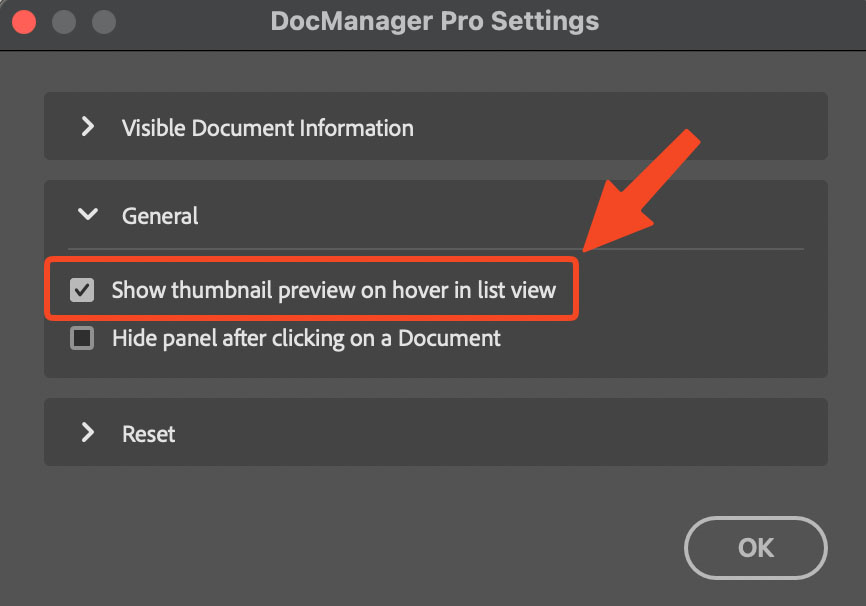
When using List View, you can now instantly see a document preview by hovering over its name. This makes it easier to identify documents at a glance without switching between them. The thumbnail preview can be disabled in Settings → General if you prefer the previous behavior.
Improved: Performance with Many Open Documents
Working with many open documents is now significantly faster. Previously, a loading bar could appear when you had many large images open. This should no longer happen. The panel responds more quickly when switching between documents, scrolling through the list, or performing batch operations.
Improved: Thumbnail Generation
Thumbnails are no longer generated when the panel is closed or minimized, reducing background resource usage. Generation only runs when the panel is open and visible. This means DocManager Pro uses fewer system resources when you're not actively viewing the document panel, improving overall Photoshop performance.