See Camera and EXIF Data Across Open Photoshop Files
When something looks wrong across a set, you need camera body, lens, ISO, and shutter speed without diving into each tab. Photoshop holds the data, but the default flow favors one active document at a time. What helps is a single view where each open file shows its technical summary so you compare down the list instead of opening dialogs in a loop.
Why EXIF and Camera Data Matter With Many Files Open
Editorial and campaign work may mix bodies or assistants. E-commerce batches should align on resolution and color, and sometimes on capture settings when files are normalized together. If one PSD lost metadata and another did not, color or crop assumptions can drift. The fields you care about are usually the same ones in File Info: camera model, lens, focal length, aperture, shutter speed, ISO, and dates, next to document properties like dimensions and profile.
Checking Metadata One File at a Time
File Info answers almost anything about the active document. With twenty images open, opening File Info twenty times breaks rhythm. Thumbnail strips help you recognize images but rarely show ISO or lens. A table or list with one row per document and the fields you need keeps your eyes moving down the set.
See EXIF and Camera Data in the Document Panel
DocManager Pro lists important document and capture fields next to thumbnails or in list-style layouts, depending on your settings. You can read name, dimensions, resolution, color mode, bit depth, profile, create date, camera, lens, focal length, aperture, shutter speed, and ISO without activating every file. That is what “across open Photoshop files” means in practice: one place, many documents, no repeated menu diving.
DocManager Pro shows dimensions, resolution, color mode, bit depth, and capture metadata for open PSDs in one panel. Details are on the homepage.
Hide Labels When Camera or Lens Data Is Missing
Some documents have no EXIF for camera or lens. Showing “not available” on every row can clutter list view. The plugin can hide those labels when the information is missing so empty metadata does not add noise. You still see values wherever they exist.
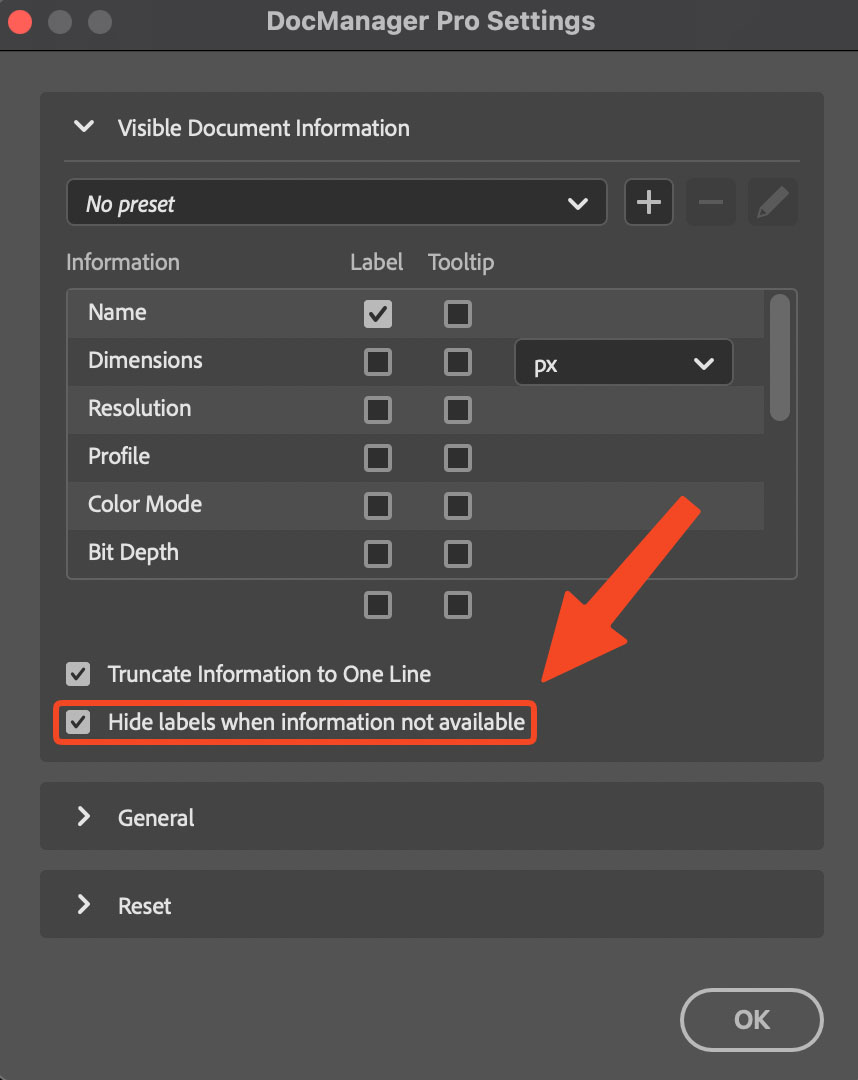
The plugin offers a setting to hide labels such as Camera or Lens when data is missing, as shown on the DocManager site.
When Metadata Is Missing or Different
Flattened copies, some exports, and certain smart-object workflows may drop or replace EXIF. A blank field in the panel does not always mean the file failed to load. It can mean the document no longer stores that property. Use the list as a quick audit: if two files should match and one shows camera data while the other does not, investigate before you batch retouch or deliver.
Conclusion
Seeing EXIF and camera data across open Photoshop files helps you validate a set before you commit hours of work. For those fields next to every open document in one panel, try DocManager Pro. Retouchers in large PSD sets can also browse DocManager for Retouchers.