Switch Open PSDs Faster Without Tab Clutter
Fifteen or twenty PSDs open means tab names shrink to useless snippets and you click around until the right image appears. You lose time on navigation that should take one gesture. Faster switching starts with seeing what each file actually looks like, not guessing from the first characters of a filename.
Switch Faster With Thumbnails
The quickest fix is to replace filename guessing with image recognition. A thumbnail grid lists every open document as a small preview; you pick the right canvas in one click. DocManager Pro adds that document panel so each open PSD is visible at a glance.
DocManager Pro shows all open PSD files as thumbnails so you can switch between documents instantly. Try DocManager Lite for free.
Why Tabs Break Down With Many Documents
The tab bar is fine for a handful of files. Past roughly ten documents, labels truncate and look alike. Hovering and clicking through tabs adds up on campaigns and batches. Thumbnails sidestep that: you see the image, not a shortened filename.
Use List View When the Grid Gets Crowded
When thumbnails feel tight, list view shows compact names, often with a preview on hover. You scroll many files quickly and still get a visual check when needed. Toggle between thumbnail and list layout to match screen size and how many documents are open. For high-volume retouching, list view stays fast even with thirty or more files.
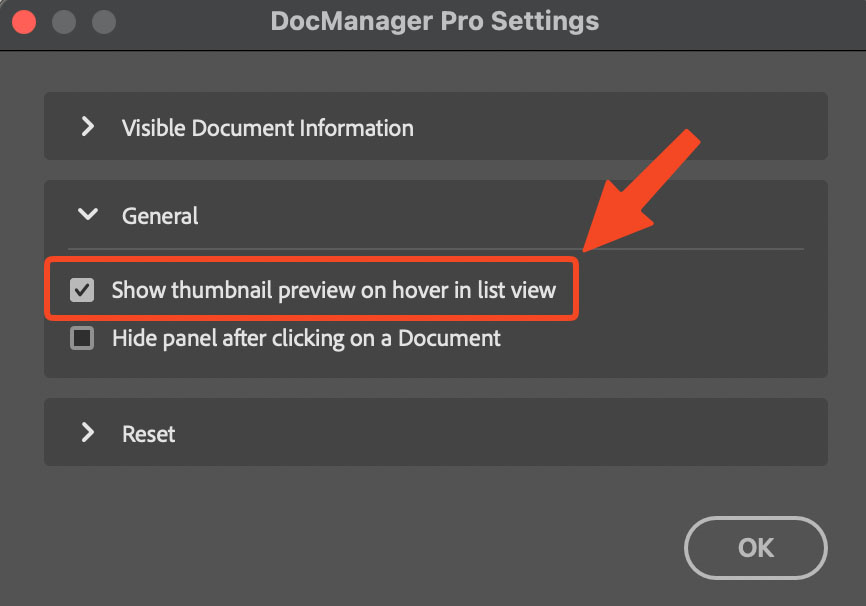
The plugin supports thumbnail and list view, with hover previews to identify documents at a glance.
Resize Thumbnails to Match Your Screen
Too small and images blur together; too large and you scroll forever. A resizable thumbnail strip lets you set preview size for your monitor and file count. The right scale cuts extra clicks and eye strain when you switch documents all day.
Conclusion
Switching between Photoshop documents quickly does not have to mean fighting the tab bar. Thumbnails and list view put the right file one click away. For a panel that shows every open PSD with both layouts on Windows and Mac, try DocManager Pro. Fashion and beauty retouchers can also explore DocManager for Retouchers.