See Every Open PSD as a Thumbnail in One Panel
You opened twelve PSDs and the tab bar only shows the first few characters of each filename. You click through tabs hoping the canvas matches what you need. Thumbnail previews fix that by showing every open document as a small image in one panel, so you pick the right file by sight instead of by guesswork.
Replace Tab Guessing With a Thumbnail Grid
Photoshop tabs list filenames, not pictures. Once you pass a handful of documents, truncated labels look alike and you waste clicks hunting the right canvas. A thumbnail grid lays out each open PSD as a visual preview. You scan the set like a contact sheet and activate one file in a single click.
DocManager Pro is a plugin that adds that panel beside your workspace. Every open document appears as a thumbnail you can click to switch. DocManager Lite includes the same thumbnail navigation for free, so you can try the layout before upgrading.
DocManager Pro shows all open PSD files as thumbnails so you can see every document in one panel. Try DocManager Lite for free.
Switch to List View When the Grid Feels Crowded
Thumbnail grids work well up to a point. With twenty or thirty files open, a grid can feel tight on a laptop screen. List view shows compact filenames in a scrollable column. You move through long batches quickly and still recognize files when you need a visual check.
The plugin toggles between thumbnail grid and list layout from the panel header. On a wide monitor, keep the grid for instant recognition. On a smaller display or during high-volume retouching, list view fits more names on screen without shrinking previews to unusable sizes.
Resize Thumbnails to Match Your Screen
Fixed preview sizes cause problems at both extremes. Tiny thumbnails blur together when you work across a large campaign. Oversized previews mean endless scrolling before you reach the file at the bottom of the stack. A slider at the bottom of the panel adjusts preview scale so you set the size that fits your monitor and how many documents you keep open.
- Open the document panel in Photoshop.
- Drag the thumbnail size slider at the bottom of the panel.
- Pick a scale where each preview is distinct but you still see several files without scrolling.
Larger previews help with subtle retouch differences. Smaller previews help when you juggle thirty hero images and need the full set on one screen.
Resize thumbnails in the plugin with the panel slider so previews stay readable at any batch size.
Conclusion
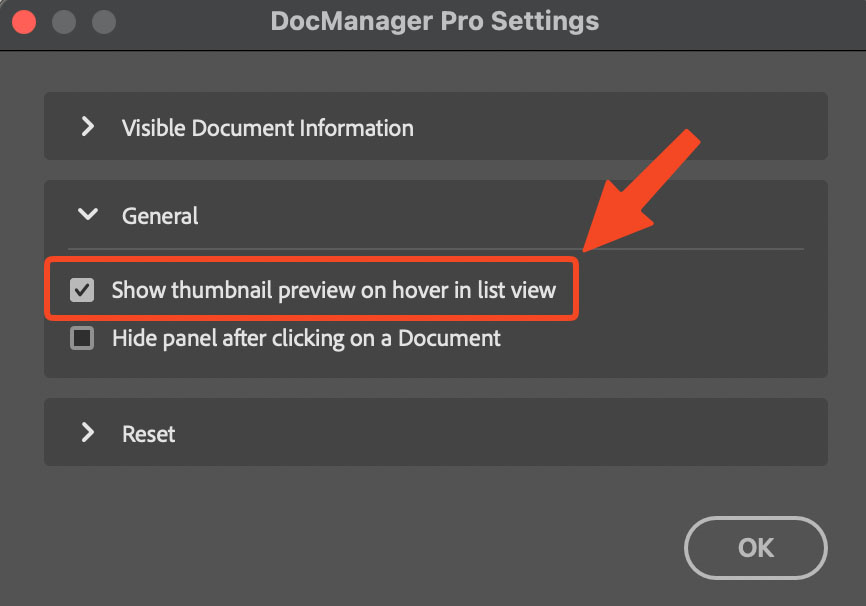
Thumbnail previews turn a row of truncated tab names into a visual map of everything open in Photoshop. Grid view, list view, resizable previews, and hover thumbnails address different screen sizes and batch sizes without changing how you edit. If you want every open PSD visible in one panel on Windows and Mac, try DocManager Pro. Retouchers managing large sets can also explore DocManager for Retouchers.