Filter Presets & Compact Document Information
September 9, 2026
DocManager Pro 1.1.7
Version 1.1.7 is now available with reusable filter presets, more compact document information in thumbnail and list views, and several layout and dialog fixes.
New: Filter Presets
If you regularly filter open documents the same way — for example by orientation, color mode, or unsaved status — you can now create, edit, and delete presets in the Filter dialog. Save a filter combination once and apply it later without rebuilding it from scratch. That is especially useful when you switch between a few recurring setups during a session, such as print-resolution files versus web-sized RGB documents.
Improved: Compact Document Information in Thumbnail View
Thumbnail view now shows document information more compactly. Details share a line instead of each value taking its own row, so tiles take less vertical space and you can see more documents at once without scrolling. Labels and values stay readable; they are just packed more tightly.
Improved: Document Information in List View
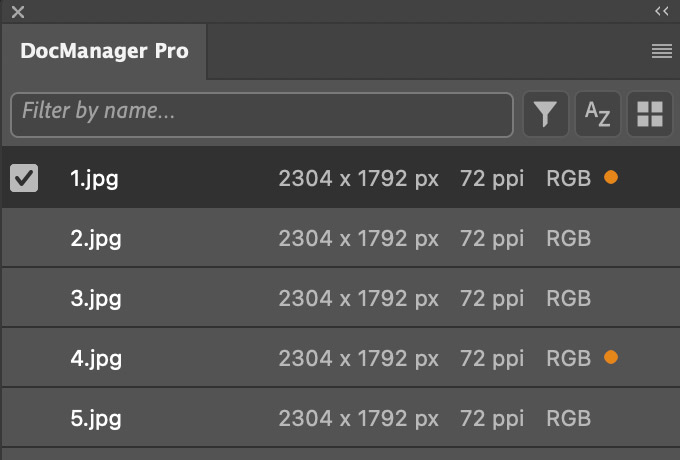
List view gets a matching cleanup. Document information is easier to scan, and the row layout stays stable as you work through a long list of open files.
Improved: Settings and Filter Dialogs Remember Expanded Sections
Both the Settings dialog and the Filter dialog now remember which section is expanded. When you reopen either dialog, you land back on the section you were using instead of starting from a collapsed or default state. That cuts down on extra clicks when you tweak the same options repeatedly.
Fixed: Preset Naming, List View Layout, and Unsaved Indicator
Pressing Enter when naming a new preset now creates the preset instead of closing the dialog without saving. List view no longer shifts rows when a document is selected or hovered, so the list stays aligned as you move through it. The unsaved-changes indicator also no longer overlaps document information in list view.
Minor Bugfixes
This update also includes several smaller bugfixes to keep the plugin stable in daily use.